Google Business Profile Optimization: The Complete 2026 Guide
Your Google Business Profile (formerly Google My Business) is the single most valuable piece of free real estate your local business has. It's what shows up in the map pack, in "near me" searches, and in Google Maps — usually before anyone ever reaches your website.
Here's the problem: most businesses claim their profile, fill in the basics, and stop. They leave half the fields blank, upload three photos, and never post. Then they wonder why a competitor with worse service ranks above them.
Optimization is the difference. A fully built-out, actively maintained profile gives Google dozens more signals to rank you on — and gives searchers dozens more reasons to choose you. This guide walks through exactly what to do, in order, with no fluff.
What's in this guide
How Google decides who ranks in the map pack
Google ranks local businesses on three factors: relevance (does your profile match what the person searched?), distance (how close are you to the searcher?), and prominence (how established and trusted are you?).
You can't control distance. But relevance and prominence are almost entirely within your control — and that's what optimization targets. Every field you complete improves relevance. Every photo, review, and post improves prominence. The businesses that win the map pack aren't lucky; they've simply given Google more to work with.
Think of your profile as a form Google grades. A half-filled form gets a half-hearted ranking. Let's fill it out completely.
Nail your primary category — it's the highest-impact setting
Your primary category tells Google what your business fundamentally is, and it's the single biggest lever on which searches you appear for. Get it exactly right.
- Choose the most specific category that describes your core service — "Emergency Plumber" beats the generic "Plumber" if that's what you do
- Add relevant secondary categories for your other services (you can add up to nine), but don't pad with categories you don't actually serve
- Check what your top-ranking competitors use as their primary category — if three of the top businesses all use the same one, that's a strong signal
Changing your primary category to a more accurate one is often the fastest ranking win available — some businesses see movement within days. Audit this first.
Complete every field — leave nothing blank
Google rewards completeness. A profile with every section filled in signals an active, legitimate business. Go through and finish all of it:
- Business name — your real name exactly as it appears in the real world (don't stuff keywords — see mistakes below)
- Address & service area — accurate, and set a service area if you go to customers
- Hours — including special hours for holidays (wrong hours kill trust)
- Phone & website — a local number ranks better than a toll-free one
- Services & products — list them out individually with descriptions; this feeds relevance directly
- Business description — 750 characters describing what you do, naturally including the services and area you serve
- Attributes — wheelchair accessible, women-owned, free Wi-Fi, etc. — check every one that applies
Your name, address, and phone (NAP) must match exactly everywhere they appear online — your website, Yelp, Facebook, directories. Inconsistent NAP confuses Google and suppresses rankings. Pick one format and use it everywhere.
Load up on photos — and keep adding them
Profiles with more photos get more clicks, more calls, and more direction requests. Photos also signal an active, real business. Build a strong baseline:
- Logo and cover photo — your brand, clean and high-resolution
- Exterior shots — so people recognize your location when they arrive
- Interior shots — what it looks like inside
- Team photos — real faces build trust
- Work / product photos — before-and-afters, finished jobs, your products in use
Then add a few fresh photos every month. A trickle of new images tells Google your business is alive and active — which quietly supports your ranking over time.
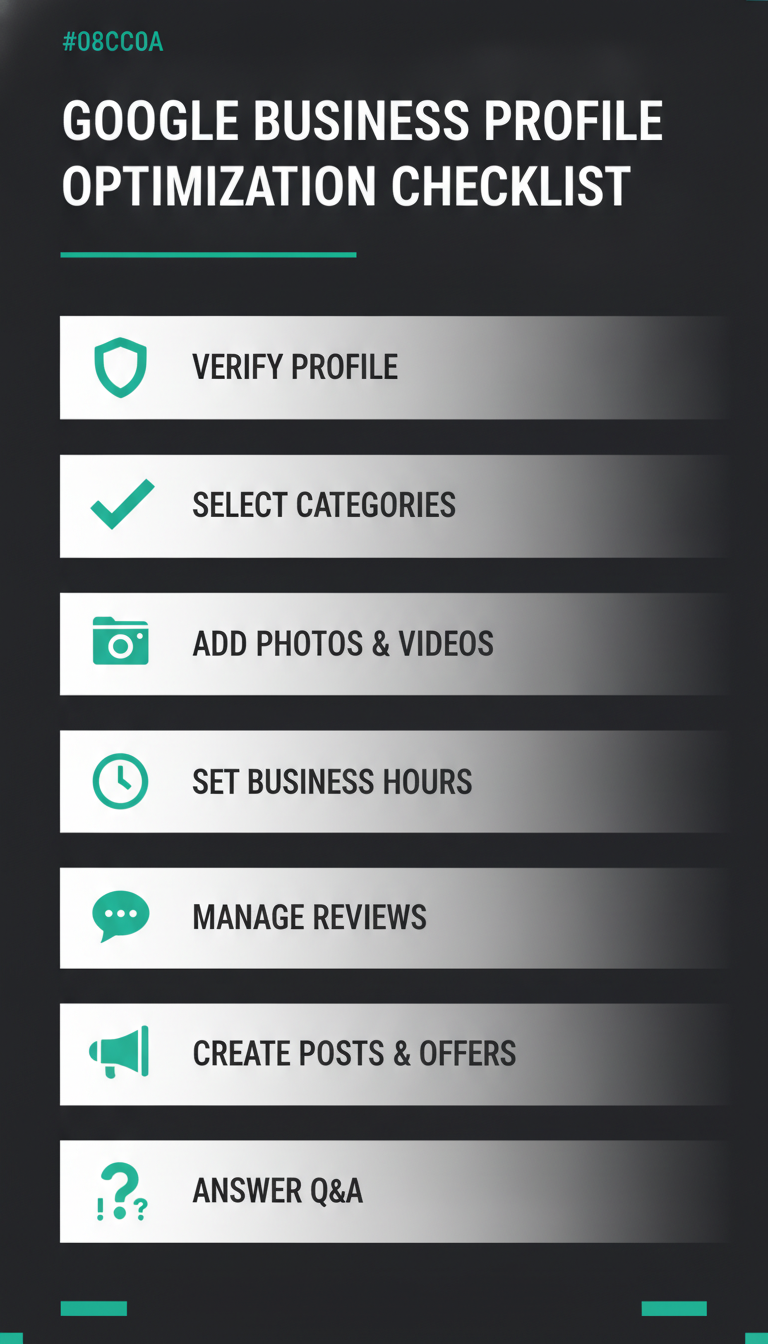
Save or share this — the 7-point GBP optimization checklist at a glance.
Build review volume — and respond to every one
Reviews are one of the strongest prominence signals Google has. Volume, rating, recency, and your responses all factor in. The businesses at the top of the map pack almost always have more — and more recent — reviews than those below them.
- Ask every happy customer, right after the job, while they're still glad
- Text them your direct review link so there's zero friction
- Aim for a steady stream — 2–4 new reviews a month beats a one-time burst of 30
- Respond to all of them, positive and negative — Google tracks engagement, and future customers read your replies
We wrote a full playbook on this. See How to Get More Google Reviews for the exact scripts and follow-up system.
Post every week to keep your profile active
Google Business Profile posts show up right on your listing — offers, updates, events, new products. They don't move rankings dramatically on their own, but they keep your profile active and they convert: a current offer on your listing gives a searcher a reason to pick you over the business next to you.
- Post at least once a week — an offer, an update, a recent job, a tip
- Always include a photo and a call-to-action button
- Keep it short and specific — "20% off gutter cleaning through July" beats a vague paragraph
Posts expire after about a week, which is exactly why posting weekly matters — there should always be a current one on your listing. See How to Use Google Business Profile Posts.
Seed your own Questions & Answers
The Q&A section on your profile is public — and anyone can answer, including random users who get it wrong. Take control of it:
- Write out the questions customers actually ask ("Do you offer free estimates?", "What's your service area?")
- Post them as questions, then answer them yourself from your business account
- This pre-loads accurate info, works in keywords naturally, and prevents misinformation
Some changes (like fixing your primary category) can shift rankings within days. Most optimization compounds over weeks as you add photos, collect reviews, and post consistently. Expect meaningful movement in 4–8 weeks of steady activity, not overnight.
Your primary category — it tells Google what you are and which searches you should appear for. After that: review quantity and recency, proximity to the searcher, and overall profile completeness.
There's no hard limit, and more is better. Build a baseline — logo, cover, exterior, interior, team, and several work photos — then add a few new ones every month. Fresh photos signal an active business and drive more clicks and direction requests.
Not dramatically on their own, but they keep your profile active and they convert — a current offer right on your listing gives searchers a reason to choose you. Post at least weekly with a photo and a call-to-action.
Yes — every step here is free and done from the Google Business Profile dashboard. The core setup takes a focused afternoon; maintenance is a few minutes a week. The hard part isn't difficulty, it's consistency.