Start here
Included on every plan
Connect your Claude
This is the one step that turns your box on. Until your AI is connected, the portal stays locked — so let's do it first. Takes about two minutes.
✅ What this unlocks: everything. Your Claude is the brain of your box — it builds your sites and tools, writes your content, runs your workflows, and answers your questions. Connect it once and the whole portal wakes up.
Two ways to connect — pick one
Most people use their own Claude subscription (Path A). If you'd rather pay Anthropic by usage, use an API key (Path B). Either one works the same once it's in.
Recommended
Path A — Your Claude subscription
Already pay for Claude (Pro or Max at claude.ai)? Use it here. Nothing extra to buy.
- Tell us you're ready.
Reply to your welcome email or hit Email support below. We hop on for two minutes and start the secure sign-in for you.
- We send you one link.
You'll get a claude.ai link. Open it, sign in with your Claude account, and approve the box. It shows you a short code.
- Paste the code back to us.
Send us that code. We drop it in and your box is connected to your account — never ours. That's it.
🤝 Why we help with this one
The Claude sign-in happens in your box's secure terminal, so we guide it live the first time. It's the only setup step we do together — everything after this, you can do yourself right in the portal.
Path B — Your own API key
Prefer to pay Anthropic per use? Paste a key and you're self-serve — no call needed.
- Get a key from Anthropic.
- Open Settings in your portal.
Click ⚙️ Settings (bottom-left) → Integrations → find Claude (Anthropic).
- Paste and save.
Drop the key in, click Save. A green dot means you're connected. Send a message to test it.
🤖 Hand this to your box
Once a key is saved, you can ask your Claude to confirm it itself. Paste this into a chat:
Confirm my Anthropic connection is live and tell me plainly whether it's working.
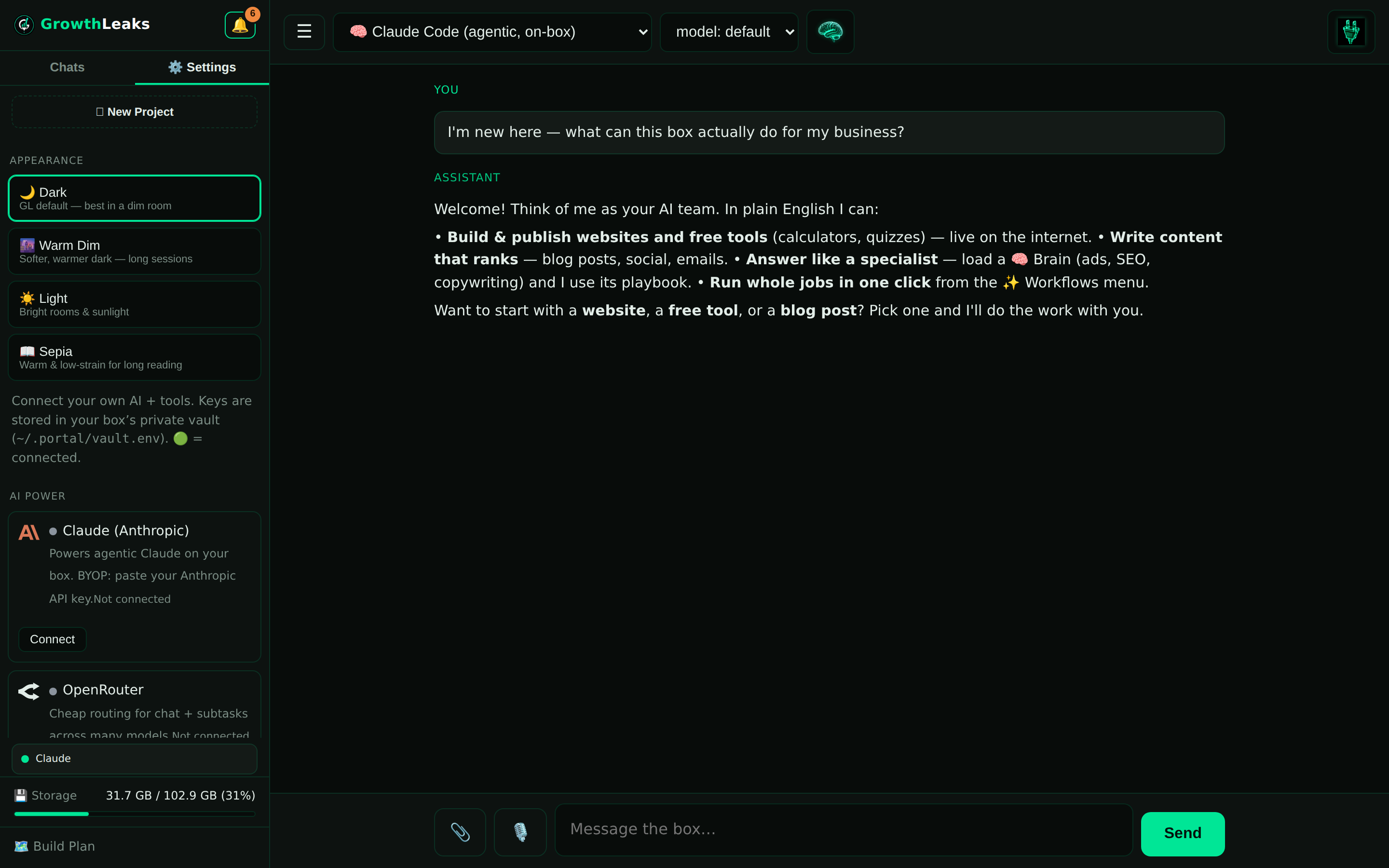
How you'll know it worked
You send a message in the portal and you get a real reply back. That's the whole test — if Claude answers you, your box is on. No green light, no reply? Jump to the questions below or email us; we'll have you running in a few minutes.
Common questions
Do I need to know any code for this?
No. Path A is us walking you through three clicks. Path B is copy, paste, save. If anything looks technical, that's our cue to help — just email support.
Is my account safe? Can you see my Claude?
Your key and sign-in live in your box's private vault, not on a shared server. We use them only to run your box. We never charge to our account, and we never show your secret back on screen.
What's the difference in cost between the two paths?
Path A uses your existing Claude subscription — one flat monthly price you already pay. Path B bills Anthropic by usage, which can be cheaper if you use it lightly or pricier if you use it a lot. Either is fine; most people start with Path A.
My replies stopped working later — what happened?
Usually the subscription lapsed or the key was rotated. Reconnect with the same steps above, or email us and we'll check it in a minute.
💬 Want us to just do it with you?
The Claude connection is the one step we're happy to hop on and knock out together. Email us and we'll get your box live.
Email support →
 GrowthLeaks · Portal Help